Your terreiro, organised with care
Giras and the ordem dos trabalhos, attendance, notices, member records and monthly fees in one place. And a website for the casa, with an agenda open to consulentes.
Already have an account? Sign in to the dashboard
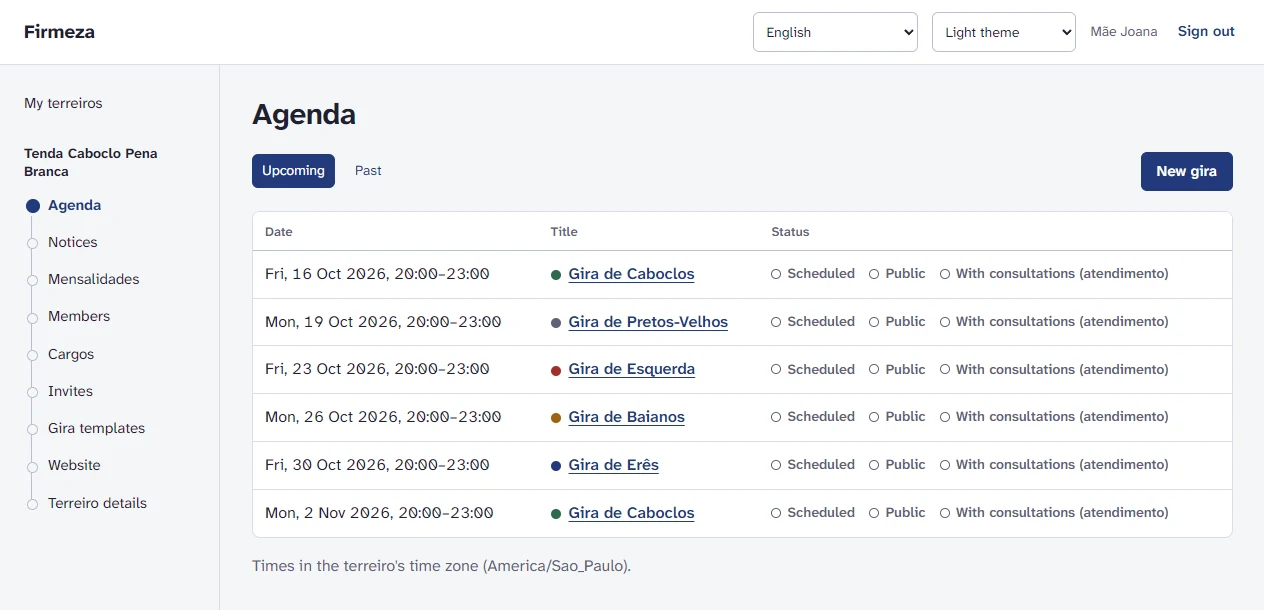
Everything the casa keeps track of, in one place
Those who lead use the dashboard, in a browser on a computer or phone. The corrente follows what concerns them in the Firmeza app: the giras, the notices, attendance and their own record.
Agenda and giras
Schedule each gira with its linha, time and whether there are consultations, and set its ordem dos trabalhos.
Attendance
Each médium says whether they're coming. Before the gira, the leadership already knows who'll be there.
Notices
Messages for the corrente, with a notification on their phone. Public notices also appear on the website.
Member records
Contact details, obrigações and cargos. Health information only with the person's consent, so whoever leads the gira can help.
Monthly fees
Record the payments you receive and see who is up to date. Whoever keeps the treasury gets access without having to be an administrator.
The terreiro's website
Home, agenda, the casa, first visit, photos and contact, at Firmeza's address or the casa's own domain.
Large, easy-to-read type, made with the casa's elders in mind. And people who don't use a phone can still have a record.
For consulentes, an open agenda
The casa's website shows the upcoming giras with the date, the time and what will happen, and whether there are consultations. No sign-up: consulentes open the website or add the agenda to their phone's calendar, and changes arrive on their own.
Getting started
Open the terreiro
Create your account and add the casa. It takes a few minutes, and whoever opens it becomes its administrator.
Add the corrente
Add each person and send them their own invite by WhatsApp or email. When they open the link, they create their own account and join the casa, linked to their record.
Follow along together
The leadership looks after the agenda, notices and records in the dashboard. Médiuns confirm attendance and get notices in the app, coming soon.
Already part of a terreiro?
Ask your casa's administrators for the invite link. When you open it, you create your account and join the terreiro straight away, with no code to type.
The agenda, attendance and notices are in the Firmeza app for Android and iPhone, coming soon to the Play Store and the App Store. The same account works there.
The casa's data stays with the casa
Belonging to a terreiro is information about religion, protected by the GDPR and Brazil's LGPD. That's why Firmeza records members only with their explicit consent, has no advertising or trackers, and lets everyone leave or delete their account whenever they want. Two-step verification protects the accounts of those who run the casa.
Questions
How much does it cost?
Nothing during the pilot. If that changes, the terreiros using Firmeza will be told well in advance.
Do I need to install anything?
Not to run the casa: the dashboard works in a browser on a computer or phone. Médiuns use the Firmeza app, coming soon to the Play Store and the App Store.
Who sees members' data?
The casa's administrators see full records. Dirigentes see what they need for the gira, and the treasury sees the monthly fees. Everyone sees their own record. The public sees only what the casa publishes on its website.
Can I use my terreiro's own domain?
Yes. The casa's website works at Firmeza's address and on its own domain too, with the security certificate (HTTPS) included.
What if someone in the corrente has no phone?
The administrators add them anyway, with a record and monthly fees. If they want to use Firmeza one day, their invite links their account to that same record.
Start with your terreiro
Free during the pilot. Open the casa today and invite the corrente when you're ready.
Open your terreiro